
Our free website accessibility checker helps you understand how accessible your website is for people using assistive technologies. By scanning your site against WCAG accessibility guidelines and common ADA compliance requirements, the tool highlights potential accessibility issues such as color contrast problems, missing alt text, keyboard navigation barriers, and screen reader compatibility concerns. It’s an easy way to run a quick website accessibility scan, review an accessibility report, and take the first step toward building a more inclusive and usable web experience.
Key Features to Highlight
Start your free website accessibility scan and see which WCAG and ADA issues may affect your site; no sign-up required.

Making your website accessible ensures that everyone, regardless of ability or the devices they use, can navigate, understand, and interact with your content. Accessible websites help people using screen readers, keyboard navigation, or other assistive technologies have the same seamless experience as anyone else.
Beyond helping users, accessibility also benefits your site by improving usability for all visitors, making your content clearer and easier to read. It can even enhance SEO since accessible sites are generally easier for search engines to crawl and index.
Most importantly, accessibility is about inclusion; creating a web experience that works for the widest possible audience. Checking your website against WCAG guidelines and ADA requirements is a simple step that brings meaningful improvements to everyone who visits your site.





Features
Automated WCAG Scanning
Instantly analyze your website for WCAG 2.0, 2.1, 2.2 violations with our automated accessibility checker. Get comprehensive reports identifying barriers affecting users with disabilities, complete with Section 508 and ADA compliance verification across all pages.
Real-Time Accessibility Analytics
Access real-time accessibility metrics directly within your workflow. Monitor WCAG compliance progress, track remediation status, and maintain ongoing ADA compliance with embedded analytics that help you stay aligned with global accessibility standards effortlessly.
Secure Team Collaboration
Work together with your development and content teams in a secure environment to review accessibility findings, assign tasks for fixing WCAG violations, track Section 508 compliance remediation progress, and ensure your entire organization maintains ADA compliance standards.
Comprehensive Compliance Reports
Generate detailed accessibility reports covering WCAG 2.0, 2.1, 2.2 success criteria, ADA requirements, and Section 508 standards. Export reports in multiple formats to share results with stakeholders, demonstrate compliance to legal teams, and maintain documentation for audits.
WCAG-Ready Accessibility Checking
Checking your website for accessibility is simple and quick. Just follow these three easy steps:

Enter Your Website URL
Type the address of the site you want to check. Our tool works with any webpage.
Run the Accessibility Scan
The tool automatically tests your website against WCAG guidelines and ADA compliance standards.
Review Your Accessibility Report
Get a clear, easy-to-understand report highlighting accessibility issues and suggestions for improvement.

POWERFUL ACCESSIBILITY INSIGHTS
Our website accessibility checker highlights common issues that can affect usability for all users. Some of the areas it reviews include:
These checks give you a clear understanding of how your website performs for people using assistive technologies, helping you take the first step toward a more inclusive web experience.
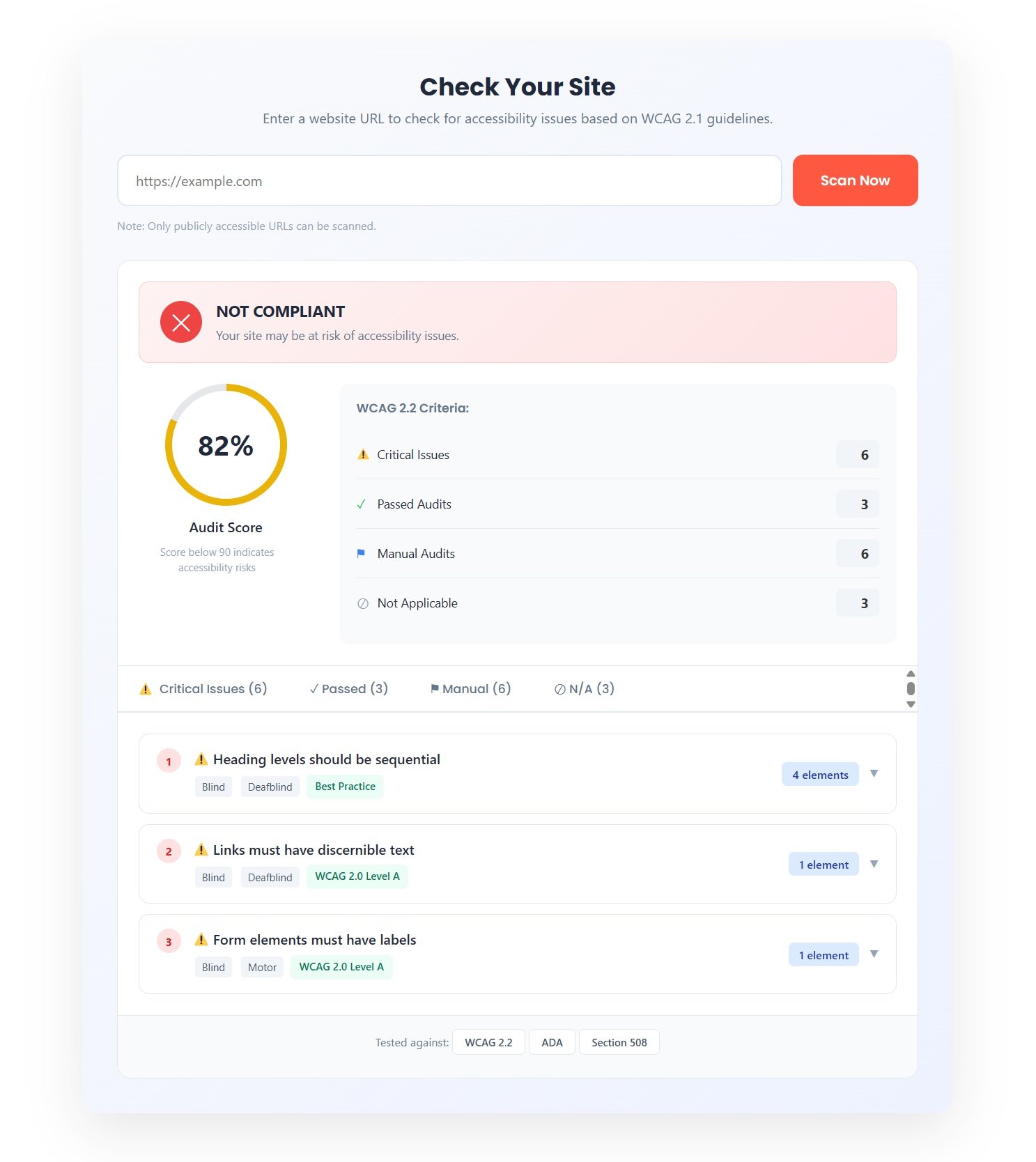

After running a scan, your website will receive a clear and easy-to-read accessibility report. This report highlights technical issues that our tool can detect, helping you understand how your website performs against WCAG guidelines and ADA compliance standards.
Typical issues the report identifies include:
The report is designed to give you a practical first look at your website’s accessibility. While automated scans catch many common barriers, some aspects of accessibility; like the clarity of content or logical reading order, require human review. Think of the report as a helpful guide to understand where improvements can be made, so you can start making your site more inclusive for all users.
Accessibility Standards Explained
Web accessibility standards exist to help make websites usable by everyone, regardless of ability or device. Our accessibility checker references widely accepted guidelines from around the world to help you identify issues and take steps toward a more inclusive website.
WCAG (Web Content Accessibility Guidelines)
The WCAG guidelines are the most widely recognized international standards for website accessibility. They focus on making content: perceivable, operable, understandable, and robust. Our tool checks for common issues aligned with WCAG 2.0, 2.1, and 2.2, including levels A, AA, and AAA.
ADA (Americans with Disabilities Act)
The ADA is a U.S. civil rights law that applies to digital experiences. While it doesn’t prescribe specific technical rules, it generally references WCAG guidelines for web accessibility. Our tool helps you see which areas of your site may need attention to better align with ADA expectations.
Section 508 (U.S. Federal Accessibility Standard)
Section 508 applies to U.S. federal agencies and organizations that work with them. It requires websites and digital content to be accessible, using WCAG criteria as a reference.
EN 301 549 (European Accessibility Standard)
EN 301 549 sets accessibility requirements for websites, mobile apps, and software in the European Union, referencing WCAG guidelines.
AODA (Accessibility for Ontarians with Disabilities Act)
AODA is a Canadian law focused on improving accessibility for digital services in Ontario. It also relies on WCAG standards for web accessibility.
Equality Act 2010 (United Kingdom)
The UK Equality Act requires reasonable adjustments to make digital services accessible. Following WCAG standards is considered the benchmark for compliance.
International & Regional Guidelines
Many countries and regions reference WCAG or related guidelines, including:
By aligning your website with these standards, you can provide a more inclusive experience for all users, regardless of where they are in the world.
Our free website accessibility checker is designed to support anyone looking to make their website more usable and inclusive. This includes:
No matter your experience level, our tool provides clear insights to help you improve accessibility and usability for all users.

TESTIMONIALS
Building an Inclusive Web for Everyone



Start your free accessibility scan today. Test your website for WCAG 2.0, 2.1, 2.2 violations, ADA compliance, and Section 508 requirements. Get instant results with detailed remediation guidance.
A website accessibility checker scans your site for common technical barriers that can make it difficult for people with disabilities to use. It looks for things like missing alt text on images, poor color contrast, keyboard navigation issues, and other elements related to WCAG and ADA standards. The tool then generates an accessibility report highlighting what’s found and where improvements can be made. Automated scanners catch many issues, but some checks still require manual review to fully assess accessibility.
To check your website’s accessibility, enter the page URL into the accessibility checker and start the scan. The tool will automatically test the content against recognized guidelines like WCAG and provide a report showing detected issues and suggestions. You can repeat this process for different pages or sections of your site to get a broader picture.
Yes, the accessibility scanner is completely free, with no signup required. You can run as many scans as you like, for different pages or domains, to monitor accessibility status over time. Regular checks help you track improvements and catch new issues as your site evolves.
Automated accessibility scans highlight many common issues, but they do not guarantee full compliance with WCAG or ADA standards on their own. Some aspects, like meaningful alt text, logical reading order, and usability with assistive technologies, still require manual evaluation. Think of the report as a helpful first look and guide, not final certification.
Common issues include poor color contrast, missing or insufficient alt text, unlabeled form fields, keyboard navigation barriers, and improper heading structure. These are exactly the things many automated tools surface because they align with WCAG success criteria and impact usability for assistive technology users.
Yes. Many accessibilities best practices, like using clear headings, descriptive link text, semantic HTML, and proper alt attributes, also help search engines understand and index your site better. Improved accessibility often leads to better usability, which in turn can positively impact search performance.
No. The reports are designed to be clear and actionable, explaining each issue in plain language. While some fixes may require developer involvement, the descriptions help you or your team understand what needs to be improved and why it matters.
Most free scanners perform a page‑by‑page scan, meaning you can enter different URLs from your site one at a time. For full‑site analysis or continuous monitoring, comprehensive tools or additional features might be needed.
Automated checks catch a large portion of common accessibility issues, but they don’t cover everything. Industry sources estimate that automated tools identify many, but not all, accessibility barriers; which is why combining them with human review provides the most complete assessment.
After reviewing your accessibility report, you can begin addressing the listed issues: add missing alt text, adjust color contrast where needed, improve form labels, and fix navigation problems. For deeper accessibility assurance, consider additional manual testing or professional guidance.
Legislations & Standards
Legal Disclaimer:
The content on this website is for informational purposes only and does not constitute legal, financial, or professional advice. While we strive for accuracy, we make no guarantees regarding the completeness, reliability, or suitability of the information. Users should consult qualified professionals before making any decisions based on the content provided here.